From a fuzzy goal to a working backlog in a single pass. KanAssist writes a real plan
from a brief you already have, drops every task on a Kanban board, and re-plans
itself when reality drifts — so you skip the day-one configuration tax other tools charge.
You've tried three other ways. Here's why they stopped working.
Most teams have already tried to make something else fit. See if one of these sounds familiar.
✦ You tried the AI chat
Great plan. Nowhere to put it.
You typed a brief into a chat assistant. It gave you a decent outline. Now it lives in a scroll-back you'll lose — no dates, no owners, no board. By Wednesday, nobody remembers what was decided.
KanAssist: the plan becomes real tasks on a real board. Same AI quality, none of the "where did I put that?"
✦ You tried the pretty Kanban tool
Beautiful board. Useless at planning.
Every new project starts the same: hand-type 30 cards before anyone can move. Whatever AI ships with it is a bolt-on. You still do all the thinking — the tool just stores it.
KanAssist: the board is generated from a brief you already have. Skip the 30 cards. Start with a plan everyone can see.
✦ You tried the enterprise platform
Can plan anything. Costs a week to configure.
Enterprise-grade for enterprise-sized teams. Your 4-person crew spends more time setting up custom fields than shipping. By the time the workflow is right, the deadline moved.
KanAssist: Kanban basics that work on day one. AI planning when you want it. Nothing else.
Wait, it does that?
Four moments most tools miss.
The little leaps that turn "another Kanban tool" into "the one we keep."
Snap a whiteboard photo. Get a working board.
Migrate a workshop, a sticky-note wall, or a screenshot from the tool you're leaving. Vision AI reads the columns and cards and rebuilds them in seconds — up to 24 columns and 400 cards, atomic transaction.
Elsewhere: manual entry, or a paid migration add-on, or "we'll get to it next sprint."
Type a fuzzy goal. AI rewrites it as an outcome.
Stuck staring at a blank textarea? Write a rough sentence and one click gives you 2–3 outcome-oriented rewrites. Pick the one that fits — and the rest of the plan flows from a sharper starting point.
Elsewhere: a blinking cursor and the silent dread of "good enough."
Reality drifts. KanAssist re-plans from where you actually are.
When tasks slip, get added off-plan, or sprints overrun, a banner offers a one-click re-plan that uses the *current* state as the starting point — not the version you wished into a doc three weeks ago.
Elsewhere: a stale plan in a doc nobody opens, and a meeting to "re-baseline."
"Your plan is missing a rollback." (Says the AI, before your CEO does.)
A skeptical executive, a senior engineer, and an end user each tear into your plan. Plus a missing-items check that flags things plans like yours usually include — comms schedule, QA gate, rollback plan. One click adds them as tasks.
Elsewhere: a stakeholder finds the gap in a meeting that didn't need to happen.
One source of truth
One board. Four ways to look at the work.
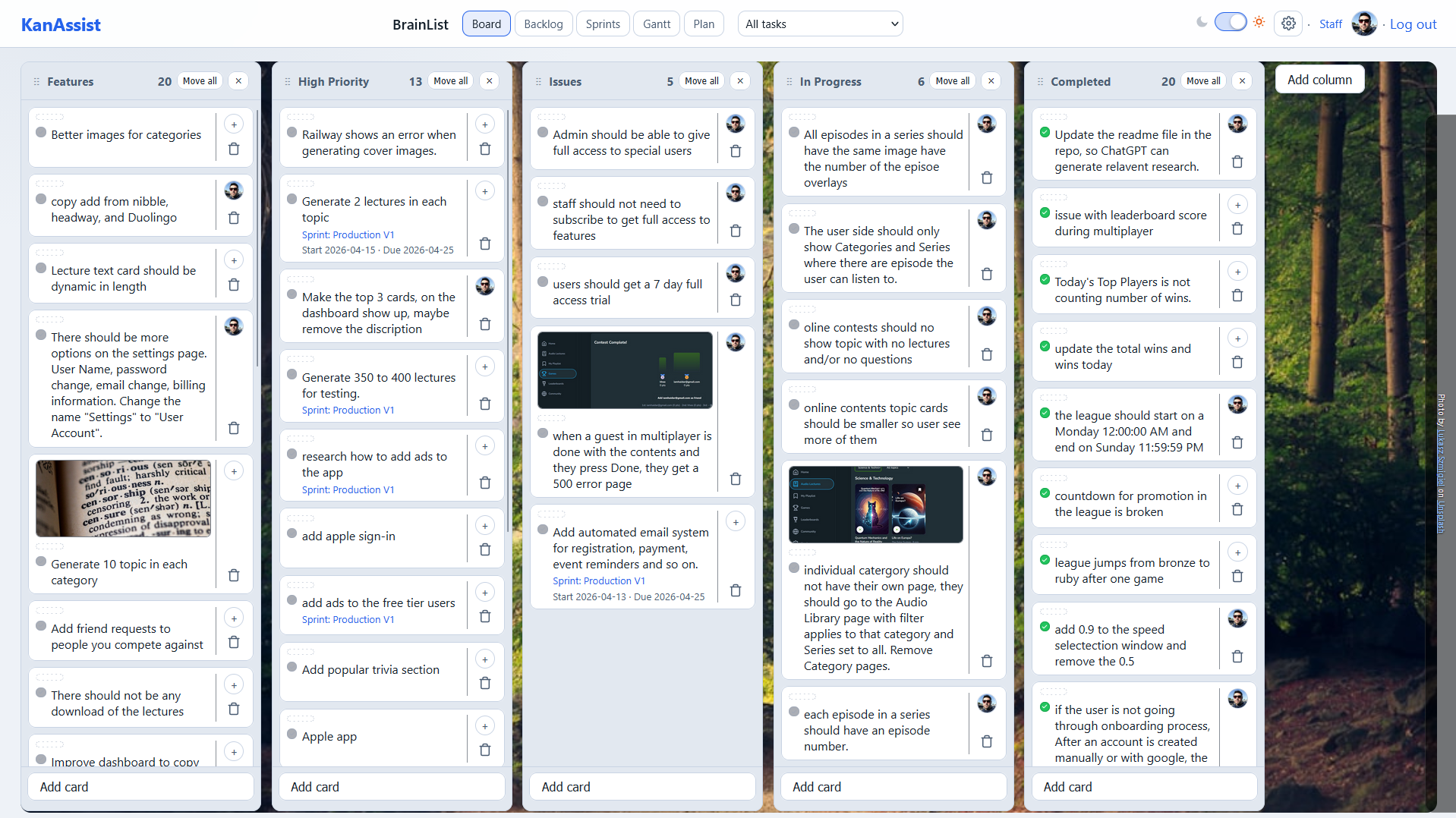
Board for execution. Backlog for prioritization. Sprints for rhythm. Timeline for dependencies. Same tasks — just the lens that fits the moment.
Board view
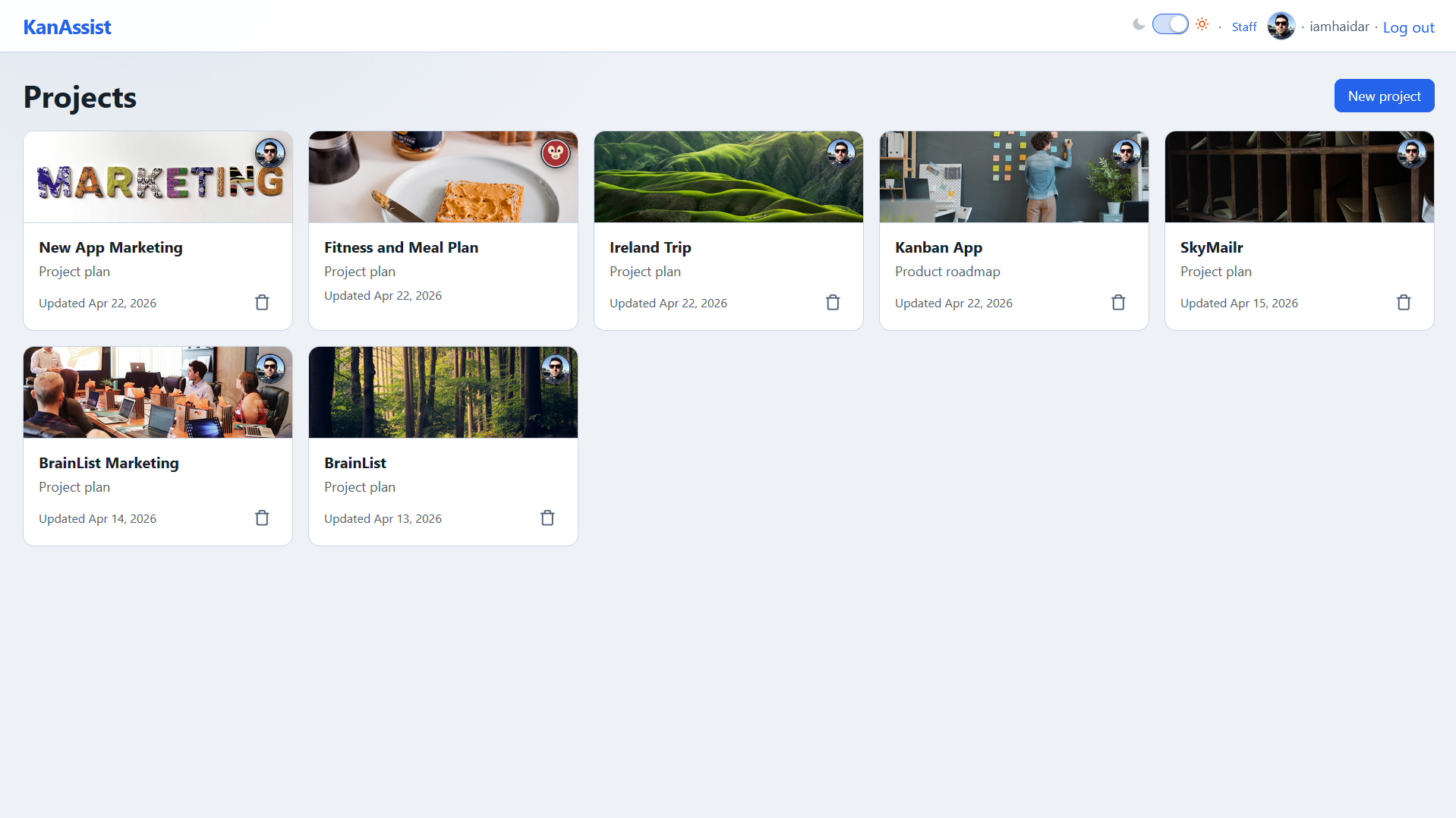
Drop on empty columns just works. Cards land where you let go — even on a column with nothing in it. Inline-edit titles wrap to multiple lines so you can see what you're typing. Big tap targets for "complete." Five-level priority chevrons in tasteful colors. (You'd be surprised how many tools get the small things wrong.)
Backlog view
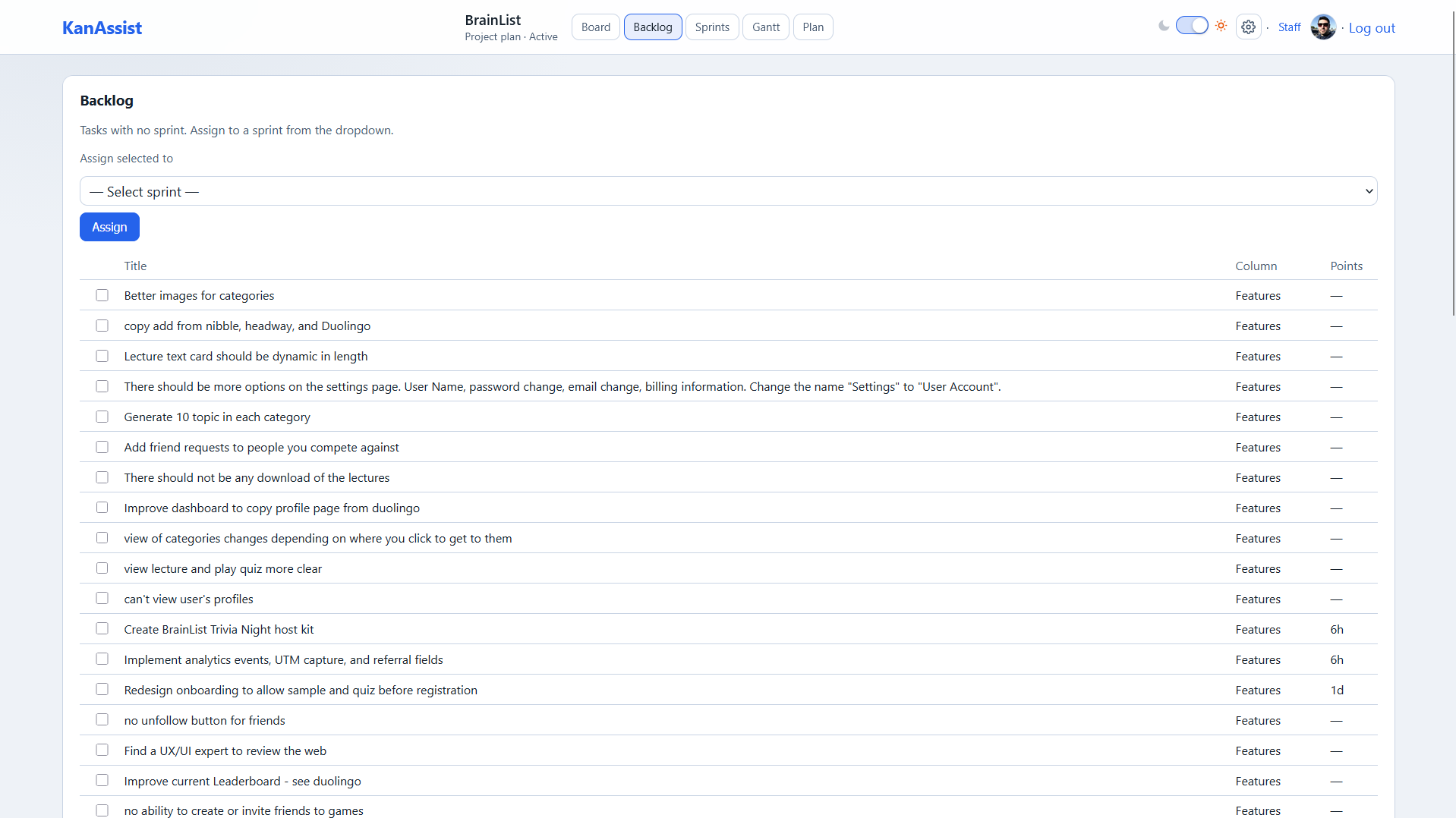
Spreadsheet-fast. Inline-edit every cell. Title, ID, points, priority, assignee, labels, dates, column. Press Enter to save and start the next row. Stack four filters at once. Bulk-assign a whole filtered set to a sprint in two clicks. Keyboard-first from the first row to the last — no modal between you and the next task.
Sprints view
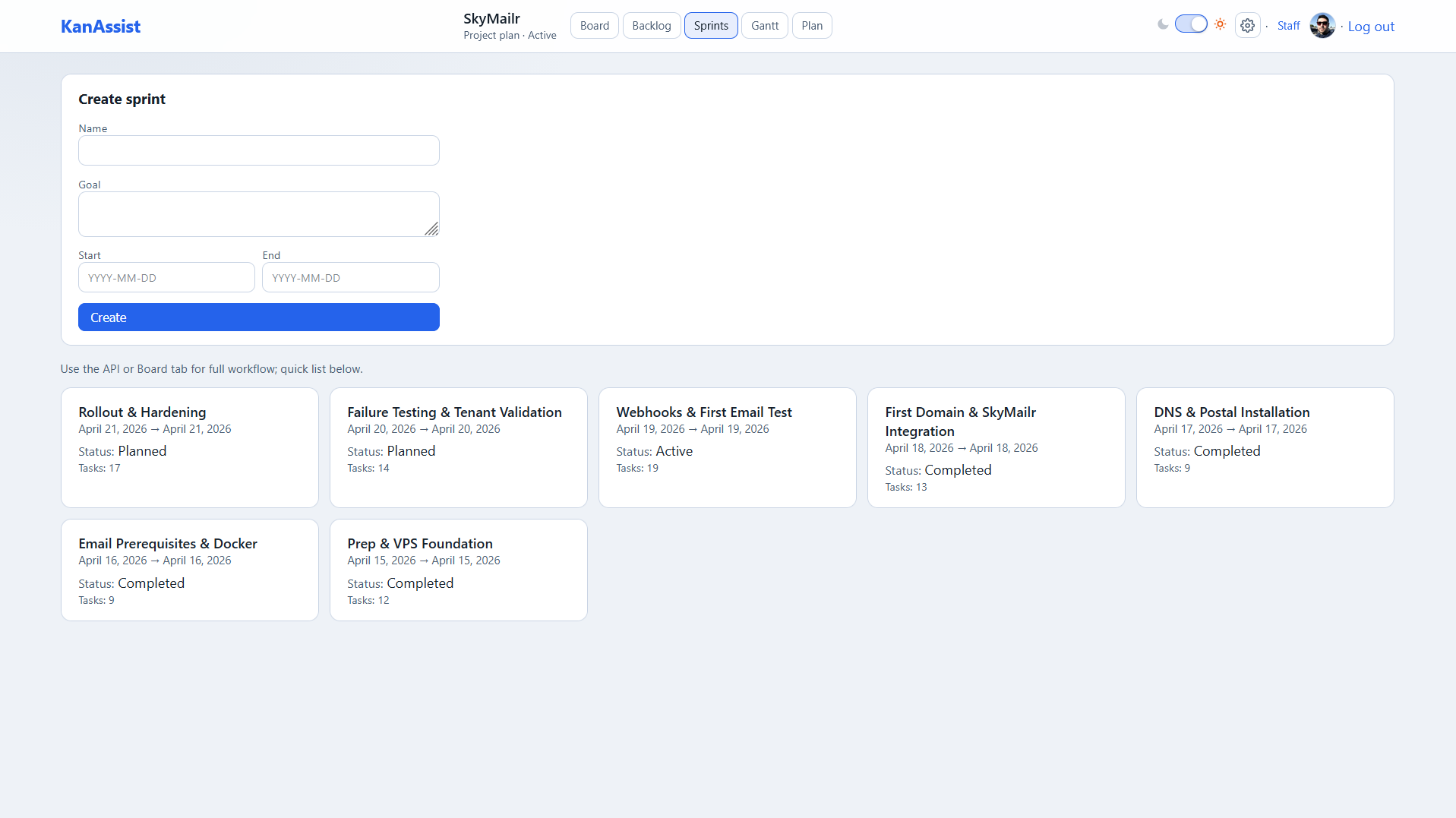
Sprints without the configuration tax. Activate, complete, and cancel with single clicks. Closing a sprint asks where incomplete tasks should go (next sprint, backlog, unassigned) and remembers the answer. Capacity, committed, and completed points are tracked automatically — no plug-in, no admin role, no scheme.
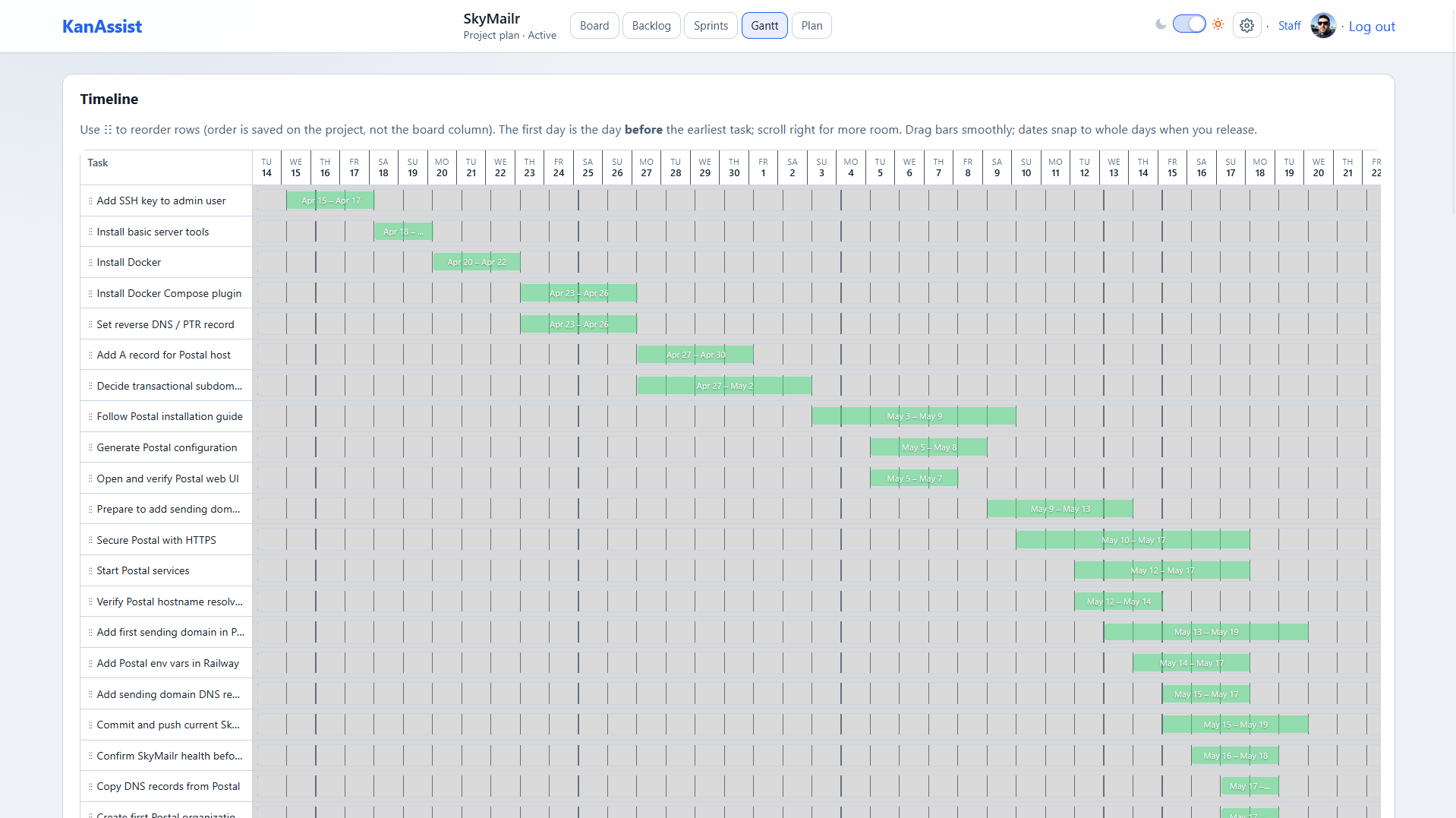
Timeline view
A real Gantt, drawn for free. Auto-rendered the moment you add dates. Sticky title column, sticky date header, today marker, weekend tint. Drag the bar's center to slide; drag an edge to resize; drag rows to reorder — and the order persists. No add-on. No upgrade tier.
Everything you need
Fundamentals that don't feel fundamental.
A focused set of Kanban essentials — done well, with the small details other tools either skip, charge for, or bury behind a marketplace add-on.
Instant boards. Zero setup.
Columns, drag-and-drop, and keyboard-speed edits. Choose a Standard layout or start empty. No fields to configure, no admin to email.
→ Day-one productive instead of week-one.
Backlog at the speed of thought.
A spreadsheet-grade backlog. Inline-edit every column, stack four filters, bulk-assign to sprints. Press Enter to save and immediately start the next row.
→ Grooming a long backlog without a modal per card.
Timeline that draws itself.
Auto-Gantt the moment you add dates. Drag bars to slide, edges to resize, rows to reorder. Today marker and weekend tint included.
→ Free. Not an add-on. Not a paid tier.
Ownership, not confusion.
Every task carries an avatar, on the board and in every list. Click to assign in two clicks. Per-user accent colors stay consistent across the app.
→ End the "who's doing X?" Friday Slack.
Labels that match how your team thinks.
A project-wide palette of eight professional-grade colors. Change a color once — every task using it updates. Create labels inline from the picker. AI labels you didn't define get an "Add to palette" button.
→ Not the same 10 hardcoded colors per board.
Boards worth opening.
Cover images on cards. Full-bleed board backgrounds with built-in Unsplash search. Paste a screenshot from your clipboard onto a card — it becomes the cover.
→ Personality, with proper photographer attribution.
Snap a board, get a board.
Migrate from another tool with a screenshot — vision AI reads the columns and cards and rebuilds them. Up to 24 columns, 400 cards, atomic transaction.
→ Hours of manual entry, gone.
Sprints, with the metrics.
Activate, complete, and cancel sprints in single clicks. Carryover handled — closing a sprint asks where leftover tasks go. Capacity, committed, and completed points tracked automatically.
→ Sprint hygiene without the admin role.
Stable task IDs, like the big tools have.
Every task gets a clean key (BILL-12 style) that survives replans and refinements. Reference a task in a Slack thread or PR — the link still works tomorrow.
→ Devs and ops people scan for this. We have it.
AI planning, the way it should work
An AI that plans. Not one that auto-completes.
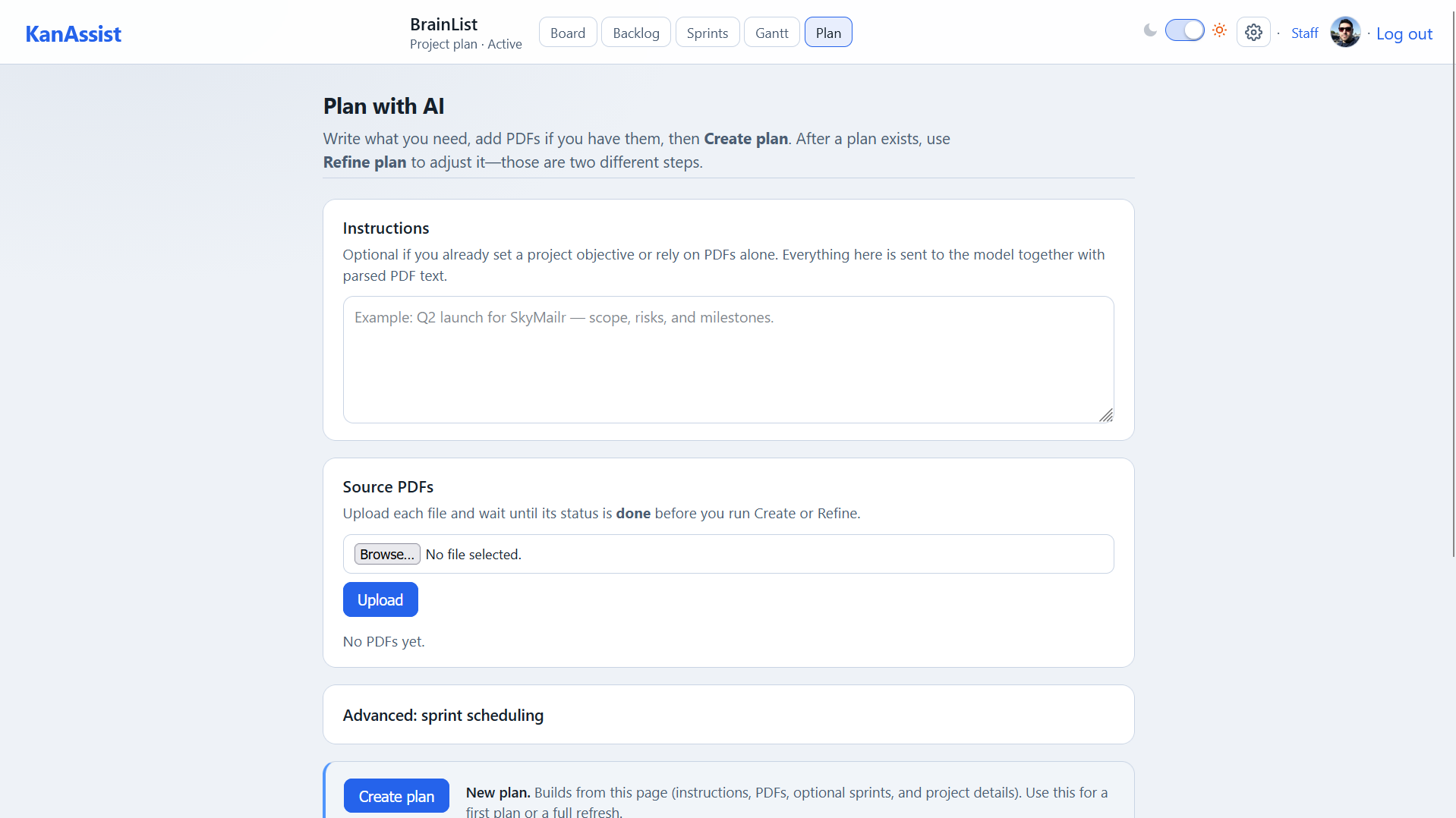
Other tools added an AI tab last quarter. We started with the AI as the planning surface. Answer five short questions; the AI asks a few sharp ones back; it writes a real narrative plan, drops every task on your board, and critiques itself before you ship.
Six plan types, four methodologies. Project, business, marketing, launch, roadmap, strategy — paired with outcome-first / milestone-driven / risk-first / discovery & delivery. The AI shapes the plan to your actual style.Most "AI" features are one-size-fits-all paragraphs.
Outcome rewriter + clarifying questions. Type a fuzzy goal — get 2–3 sharper outcome rewrites. Click once and the AI asks 3–5 targeted questions about your brief before writing a word.No more vague plans from vague briefs.
Pre-mortem, baked in. The brief asks "imagine the plan failed — what went wrong?" and feeds your answer into the prompt so the AI accounts for failure modes from the start.Most planners hope you'll think about risk later.
Grounded in your PDFs, not in thin air. Token-aware chunking, project-scoped — your documents inform the plan and never leave the project.The AI doesn't make up your context. It uses the one you have.
Tasks land on the board with confidence stars. Every AI task ships with a 1–5 confidence rating so you see at a glance which to trust and which to double-check.You stay in charge. The AI doesn't pretend to be certain.
Three-persona critique + missing-items check. A skeptical executive, a senior engineer, and an end user each tear into your plan. A separate check flags what plans like yours usually include but yours doesn't. Accept any item as a task in one click.Catch the gap before the stakeholder does.
Refine in plain English. Re-plan on reality. Tell the AI "make the launch phase shorter" — it regenerates without losing your manually-edited tasks. When reality drifts, a banner offers a one-click re-plan from where you actually are.Plans stay alive. They don't rot in a doc.
Versioned plans. Exportable as PDF. Every generation creates a new version — old ones stay readable for diffing or rollback. Export any version as a PDF for stakeholders who still want a printout.Audit trail without the compliance suite.
The polish layer that signals "the team building this actually uses it." Not headline features — but you'll feel them every day.
Dark mode
Light or dark, with one toggle. Persists across sessions.
30 avatars + custom upload
Pick a procedurally-generated SVG or bring your own. Every initial gets a consistent accent color.
Multi-line title editor
Long titles wrap while you're typing. What you read is what you edit.
Big tap target on "complete"
Sized for cursor and finger. Hard to miss, easy to undo.
Toast + confirm dialogs
Friendly notifications and proper "are you sure?" before destructive moves.
Keyboard nav + screen reader
Tab, Enter, Esc work everywhere they should. ARIA labels throughout.
Image-paste from clipboard
Copy a screenshot, paste onto a card — it becomes the cover.
Sample project on signup
First thing you see is a populated board, not a blank canvas.
Guided tours per tab
Light-touch walkthroughs you can skip — they never repeat once you've seen them.
Auto-accept invites
Pending invitations clear themselves the moment the invitee creates an account.
Five-level priority chevrons
P0 to P4 in proper colors — readable at a glance, no decoder ring needed.
REST API
Build automations, sync to your warehouse, or just script the boring bits.
How it works
From brief to board in four steps.
No setup. No field configuration. No 30-card hand-typing marathon.
1
Drop in a brief
Upload a PDF or paste a pitch deck. KanAssist parses it and waits for your go.
2
Answer 5 questions
Outcome, audience, constraints, non-goals, success signals. Five minutes, tops.
3
AI writes the plan
A narrative plan, section by section, with tasks extracted and dropped into Backlog.
4
Your team ships
Open the board, assign, drag, ship. Re-plan whenever reality drifts.
Who's on KanAssist
Built for teams that actually ship things.
KanAssist adapts to how you work — not the other way around. Pick the vignette that sounds like your week.
Product teams
PRD lands Monday. Board's ready Tuesday.
Drop the PRD, get a task breakdown with owners
Track epics across sprints without a spreadsheet
Stable task IDs so engineering links don't rot
Marketing
One brief in. One campaign plan out.
Plan launches from a single brief, not six meetings
Assign creative and channel owners before Friday
See the whole quarter on one timeline — Gantt included
Founders & ops
Pitch deck in. Launch plan out.
Paste a deck, get a structured plan your cofounder can read
Stand up a board in minutes — not a process
Free during open beta (no card, no clock)
Agencies
One workspace per client. Branded. Billable day one.
Separate boards and plans per client project
Invite clients as collaborators — they see progress, not pricing
Brand each board with its own cover and palette
Straight talk
We're new. So here's the honest version.
No invented logos, no anonymous quotes, no "trusted by thousands." Just what's true today — and what we're committing to.
No testimonials yet.
KanAssist is in open beta and we haven't earned a single customer quote. When we have real ones, they'll be attributed to real people who agreed to be named. Until then, this space stays empty on purpose.
→ Judge the product, not the wall of logos.
Everything on this page is shipped.
Board, backlog, sprints, Gantt timeline, photo-to-board import, AI planning, PDF grounding — all of it works in the product right now. If something is still on the roadmap, this page says so in the same sentence.
→ Nothing here is "coming soon" unless it says so.
The plan is written by an AI.
Generated plans are suggestions from a language model. They're a strong first draft that saves you the blank page — they are not professional, legal, or financial advice, and you should read them before you commit your team to them.
→ You stay the editor. Always.
What you get
Free tier that actually works. Paid tier worth paying for.
No retroactive paywalls, no lock-in tactics, no "premium" tier hiding the basics.
Free forever — small teams
Boards, backlog, sprints, timeline. The whole craft.
Unlimited Kanban boards, backlog, sprints, Gantt timeline Project label palette, covers, board backgrounds, dark mode Photo-to-board import, stable task IDs, REST API Up to 3 collaborators per project, Google Sign-In + email invites
Other free tiers gate Gantt, labels, or board count. Ours doesn't.
Team — when you want the AI
All of the above, plus the AI planning loop.
AI plan generation: brief wizard, 6 plan types, 4 methodologies AI clarifying questions, outcome rewriter, pre-mortem, PDF grounding Three-persona critique, missing-items check, re-plan on reality Plan versioning, PDF export, unlimited collaborators per project
$5 / user / month. Flat per-seat. No token-usage surprises. No "premium / enterprise / platinum" upsell ladder.
Simple pricing
Honest pricing. Nothing to surprise you.
Free for everyone during the open beta. After that, small teams stay free forever.
In open beta through ~6 months · Pricing below kicks in after
After beta · Free
Free
$0/ forever
For small teams, side projects, and "just me" plans. Up to 3 collaborators.
Kanban boards, backlog, sprints, timeline (Gantt)
Up to 3 collaborators per project
Labels, assignees, dates, covers, backgrounds, dark mode
Nothing you create during the beta gets deleted. Nothing gets hidden behind a paywall retroactively.
Worst case for a 10-person team after launch: $50/month to keep the AI features you got used to.
Prices are in US dollars and exclude any VAT or sales tax that applies where you are.
Paid plans renew monthly until you cancel; cancelling stops the next renewal and you keep access to the end of the period you paid for.
Full detail in the Terms of Service
and the Refund & Cancellation Policy.
Frequently asked
Especially around pricing.
The questions we'd want answered before signing up for a beta.
What stays free after the beta?
All the Kanban essentials — boards, backlog, sprints, Gantt timeline, labels, assignees, covers, backgrounds, dark mode, photo-to-board import, REST API — stay free forever for projects with up to 3 collaborators. Only AI planning and larger teams move to the $5/user/month Team plan. You won't get locked out of anything you built during the beta.
What happens if my team grows past 3 collaborators after the beta?
You'll see a banner asking you to upgrade to Team. Existing projects stay intact — we won't archive anything or hide tasks. You can also remove a collaborator to stay under the limit, or downgrade a project back to solo.
Do I need Team just to use AI planning?
After the beta, yes. AI planning (brief wizard, PDF grounding, critique, re-plan, refine) moves to the Team plan. Your Free-tier projects keep all the boards, sprints, and Gantt features — you just can't generate or refine AI plans on them.
Does KanAssist work without AI?
Yes. Create boards, organize a backlog, plan sprints, run timelines entirely by hand. The AI tab is optional — skip it any time and it stays out of your way.
How does the AI use my PDFs?
Uploaded PDFs are parsed and chunked on your project. When you generate a plan, relevant chunks are passed to the planner as grounding context along with your instruction. The AI never calls out to your files directly and never stores them outside your project.
Can I switch from another tool without losing my board?
Yes. The Kanban primitives (columns, cards, labels, assignees, covers) map one-to-one. Photo-to-board import can rebuild a board from a screenshot of your current setup — helpful when you want to leave the old tool behind in an afternoon.
Is my data safe?
Projects are scoped to the owner and invited collaborators. PDFs and generated plans stay on your project — nothing is shared across accounts. See our Privacy policy for full details.
Will my AI plans get deleted when the beta ends?
No. Everything you generated during the beta stays on your project forever. After the beta, you'll need Team to generate new plans or re-plan on reality — but existing plans, tasks, and boards are yours to keep.
Stop hand-typing backlogs. Start shipping.
Free during the open beta — every feature, every collaborator, every AI plan. Sign up and generate your first plan in the same sitting.
 KanAssist